将html中的uri批量智能转换成定制的urn + uri前缀
安装:
1 2
| git clone github.com:doc2git/html-uri--relative2protocal.git npm i
|
使用案例:
使用案例一:
触发命令:
1
| node replaceInAllHtml.js
|
关键触发源码(in replaceInAllHtml.js):
1 2 3
| var replaceRelativeUriToProtocalUriInHtml = require('./index.js'); var uriReplaceSrcList = require('./uriReplaceSrcList.js'); replaceRelativeUriToProtocalUriInHtml('http://localhost:3378/a/b/c/d/e/f/g', ...uriReplaceSrcList);
|
‘./uriReplaceSrcList.js’快速生成方式:
1
| find test-dir -type f | grep '\index\.html' > ./uriReplaceSrcList.js
|
‘./uriReplaceSrcList.js’ 可以是是以下格式的:
1 2 3 4
| module.exports = [ '/home/doc2git/bootstrap/url-absolute/test-dir/index.html', '/home/doc2git/bootstrap/url-absolute/test-dir/another.index.html' ]
|
或者:… (你喜欢的导出方式)
目前目前版本还没写逐行读入,生成’./uriReplaceSrcList.js’,(因为vim编辑很爽),在稍后的版本中会加入。
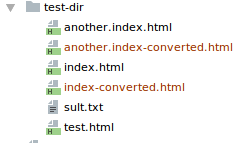
使用案例二:
触发命令:
1
| find test-dir -type f | grep '\index.html\|test\.html' | xargs node index.js 'http://localhost:3354/a/b/c/d/e/f/g/h'
|
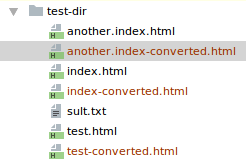
生成的目录结构变更:
 )
)
因为多向 node index.js 传了一个 test.html,
‘(… | grep …)’,所以输出多输出了test< 标记名 >.html;
上一行所讲的标记名是可变的:
replaceRelativeUriToProtocalUriInHtml 中有如下函数定义.
1 2 3
| let defaultFnRenameFileRule = function (inputFilename) { return inputFilename.replace(/\.html$/, '') + '-converted' + '.html'; };
|
也可以在 案例一 中的 replaceInAllHtml.js 中调用replaceRelativeUriToProtocalUriInHtml时传入添加:
1 2 3 4
| let defaultFnRenameFileRule = function (inputFilename) { return inputFilename.replace(/\.html$/, '') + '-converted' + '.html'; }; replaceRelativeUriToProtocalUriInHtml(uriBase, defaultFnRenameFileRule, ...args);
|
Other functionability: Maybe comming soon ….
如果发现有bug, 欢迎邮箱联系我:doc2git@yahoo.com ;
Enjoy it!
Last updated:
让文字梳理技能,用技能创造价值。